
Stripe Pricing & Fees
Square Pricing & Fees
Video Transcript:
These are two very different kind of payment processing companies.
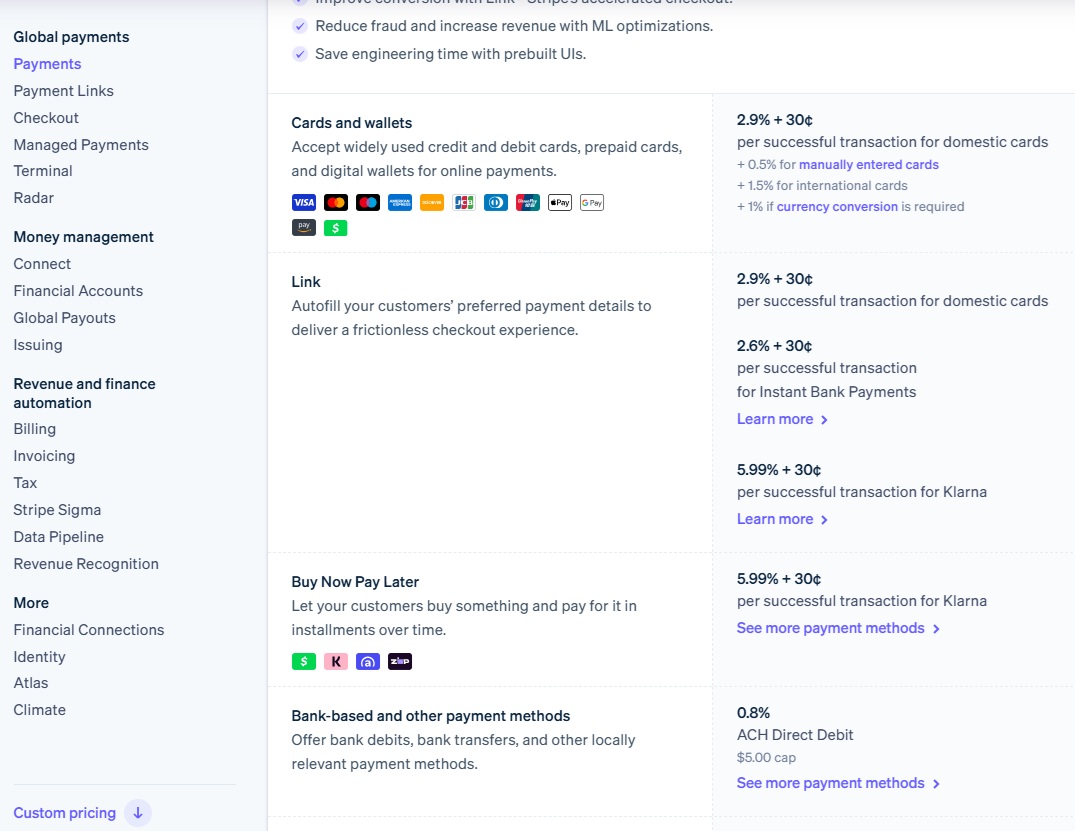
Stripe has a background in handling online payments, whereas Square’s kind of wheelhouse is more in physical in person payments. It can see here that kind of standard payments are 2.9%.
Plus 30 cents per transaction. That means that you’ll pay a minimum of 30 cents for every transaction and 2.9% of the actual sale price will go for them for domestic cards.
Now, if you go down here, it gets a bit more complicated. You have the standard things here, they add on 0.5% for manually enter cards, 1.5% extra on top of the 2.9% for international cards.
Another 1% if there’s any kind of currency conversion required.
Then they have different things like link here which is their online payment thing, which is 2.6% plus 30%, which I guess is they, once they have the information there, they can charge a little bit less on, on the flip side, if you’re doing any kind of buy now, pay later.
Klarna. Or after pay, they charge 5.9%, sorry, 5.99% plus 30 cents. If you’re doing bank transfers, it’s just 0.8% with a maximum cap of $5.
And stable coins, they’re currently charging 1.5%. Pretty sort of standard payments here. The standard one to really look at, and for comparison’s sake here, is this 2.9% plus 30 cents.
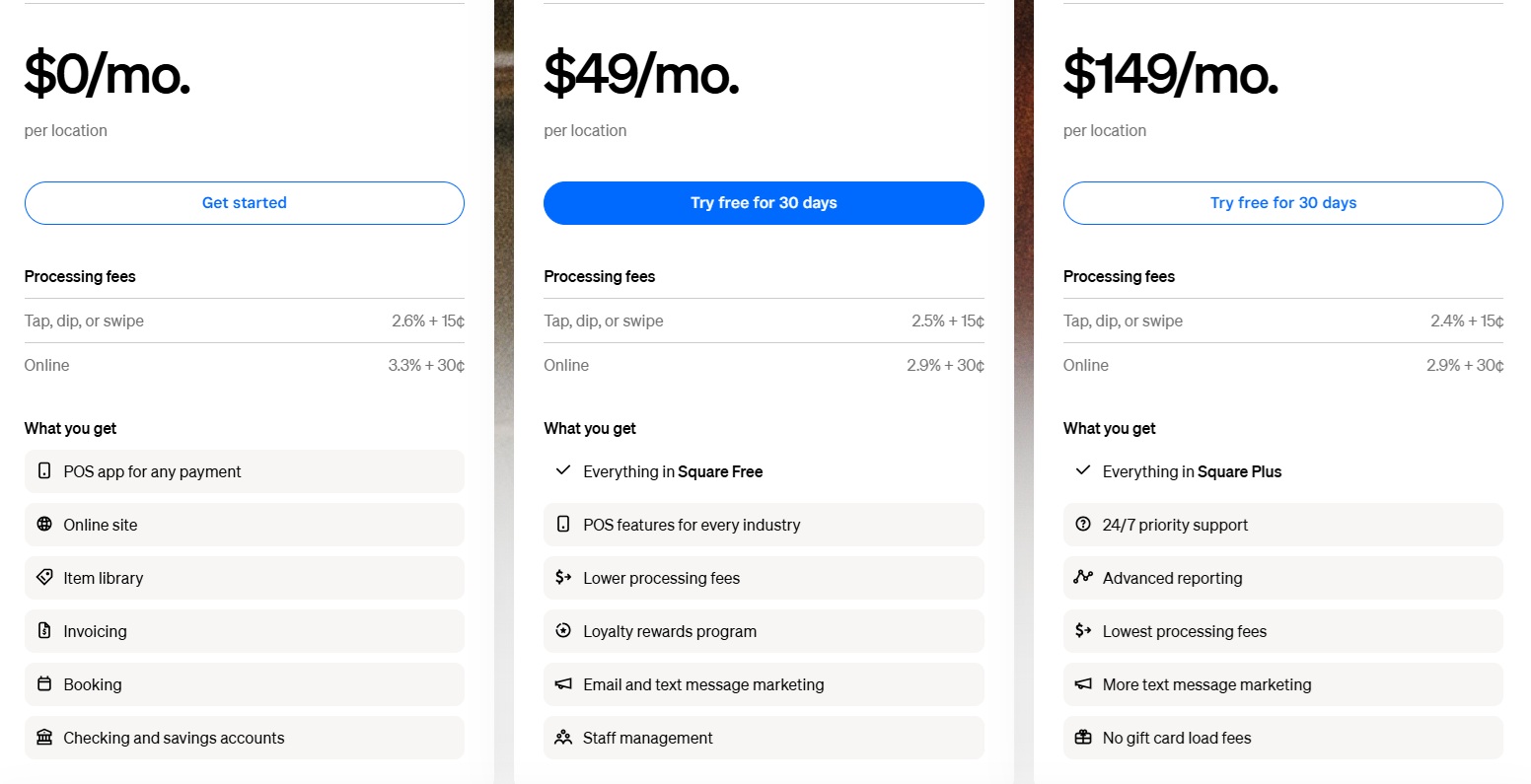
Square is a bit different in terms of how they charge things. They actually have three different sort of tiers you can pay. $0 a month, which for online payments, they’re charging you 3.3%, so higher plus 30 cents, or in-person payments for 2.6% plus 15 cents.
We’ll get to the in-person payments in a moment, but let’s look at the online ones here.
If you’re paying $49 a month, you can get it to 2.9% plus 30 cents. Again, matching with stripes fees.
And again, if you’re paying 1 49. A month, you pay the same online fee again, 2.9% plus 30 cents. The in-person tap tip or swipe payments are slightly lower though at that price.
If you go down and we see how that kind of all breaks down here, and you can see here the online p things they allow sort of API payments, which are the same as the kind of online payments above their bank transfer is 1% versus the 0.8% we saw with yeah, with Stripe they have manual card entry, there things are 3.5%, a little bit higher.
Because Stripe goes and discharges 0.5% for manual entry cards.
Here they’re charging. It’s a little bit more, it’s actually an extra 0.6%.
They use Afterpay for their, buy now pay later thing. 6% versus 5.9, 9% plus 30 cents. Basically, the same as the other ones. And they’re allowing Bitcoin payments until 2027.
They’re charging just 0% on those. And if you enter cash or checks in manually, those are also free. And again, the price is zero $49 a month or $149 a month per location.
And just the things here. International card transactions fees, 1.5% across the board. And that’s exactly matching stripe’s charges.
That’s the kind of online thing. There’s not a huge amount to pick from it. Stripes a bit more maybe straightforward in there, like the default payments for online.
Payments and are probably more widely used. But let’s compare how Stripe does on the kind of physical, in-person payments versus what Square has to offer.
Stripe now actually does have a terminal. Their fees for using cards, there’s 2.7% plus 5 cents. Pretty good kind of fees.
There. Again, charging 1.5% extra for international cards.
A 10 cent additional authorization for top to pay, that this is a new kind of feature that is built in on some Android and iPhones, which allows you to accept payments directly on the phone itself and not needing any additional hardware.
And then they have some encryption stuff here, and if you want to use their cellular or unlimited cellular plans for their devices comes in at $10 per reader per month.
They have three different tiers of readers, they have a. A Stripe reader which is very similar to the square reader.
That’s just $59 and you can do tap and mag stripe payments. And then they have two more advanced readers you can see here, which are more kind of almost like handheld point of sale systems. And those are both currently $299. I’ll link to all this in the description you can kind of see more about them.
You can see all the sort of stuff that you get here. You have to be, you have to be signed up to be a straight customer to buy these.
But it’s an easy process to do. If we’re comparing now to what Square offers for the, their kind of physical card things, they have a huge range of options.
We’ll start off with them. First one, which is actually a free card reader. If you’re a new customer, you can get a new card reader for free for the first one, and then it’s just $10 for each additional one.
And they charge a 2.6% plus 15 cents for these payments. And actually, again, if we go over here, that can actually drop down to as low as 2.4% plus 15 cents.
Comparing that back over to. To stripe there at 2.7 plus 5 cents.
If you are, you’re getting a kind of a lower percentage amount if you’re paying the additional fees actually across the board you pay less even on the free plan, but you are paying more authorization. Which one are we better?
Depend a little bit on how large transaction volumes are. Just returning to this free card reader thing here, this is just a mag stripe card reader.
It’s that’s all it does. Just magstripe payments is the only thing that, that it looks accept. If you want to do. Like tap to pay or anything like that.
Their sort of basic square reader is $59. Again, perfectly matched in price with the Stripe reader, which I’m sure is no accident. $59 there for this.
And you can accept all sorts of different payments, kind of plugs into your phone and everything. They also have a tap to pay auction, which is goes along with this, again, similar pricing to Stripe.
Now in terms of other hardware that they offer, square has a much bigger range of options than Stripe does. The next price op is the square kind of terminal, which is a much more kind of like robust feeling thing here you can see the sort of thing.
Does all the kind of payments, has a receipt printer as well, which is different from the from just the standard reader, $299.
If you want to add a hub, it’s an extra $49. And if you can also get receipt printer paper from there as well. That’s the kind of next level up and again, comparable to the to the square readers that they have here.
Very similar. To that the next level up is the square handheld at $399. This is almost like a portable POS system. It has payments built in, has a barcode scanner and a camera. You can use it for a variety of purposes. At $399 that’s gives you some functionality.
And again, Stripe doesn’t have anything that kind of really matches what this is. Then going up the next level, they have a stand which you can put your own iPad in.
You can either buy the iPad itself or just use their kind payment stand. That’s $149. But again, if you need to bring your own iPad, if you add in.
Getting an iPad from them. It’s about three $49. And they also offer the option to take magstripe payments for free as well with an additional reader.
But you need to use that little extra reader. Otherwise, you’re just left with kind of the tap to pay payments. Moving up to the next level.
They have a full kind of register system here. You can use their old one is, it’s currently still on sale at for $599, or if you want to use their more advanced one, is now $899.
This gives you a whole bunch of things here.
Again, they offer the option of adding on a magstripe reader for free extended cables, mounts, all that sort of stuff.
The kind of basic cost is 899, but you can easily add quite a bit to that if you want. And finally, they have a self-ordering kiosk option here as well.
If you want to have that, the basic cost is just $149. Again, if you want to bring your own iPad, that’s another 349 if you want to buy from them, or you can buy your own.
And you’ll probably want to get their kind of subscription service. I think that’s what they’re sure people are going to do.
That’s $50 per month per device. Keep in mind, if you are a restaurant and you have, let’s say four of these available, you’re paying $200 a month just for the hardware in it.
And then you’re going to pay the standard kind of transaction fees that we looked at already before.
There you have it.
In general, I’d say if you are looking to go online, Stripe is more probably the default option if that’s your kind of primary sales channel.
If you are an in-person business, square has a huge range of options for you to choose from at all price points, everything from a free card reader at the very low end if you just want to do mag stripe payments and you’re happy doing that all the way up to a full kind of POS cash register system here.
I’d love to hear your thoughts if you’ve used either of these before, which one you prefer.
And I look forward to reading your comments below. Thanks.
Leave a Reply