Salesforce vs Competitors: A Complete CRM Pricing Comparison
Salesforce is the market leader when it comes to CRM systems. However, its extensive ecosystem and pricing structure mean it’s not always the best fit for every business.
In this article, I compare Salesforce with seven major CRM competitors—focusing specifically on pricing and positioning, to help you understand which platform might suit your needs best.
1. Salesforce: The Market Leader
Salesforce offers one of the most comprehensive CRM ecosystems available today. Beyond core CRM functionality, it includes tools like Sales Cloud, Service Cloud, Marketing Cloud, AI-powered analytics (Einstein), app development, and integrations via Slack and MuleSoft.
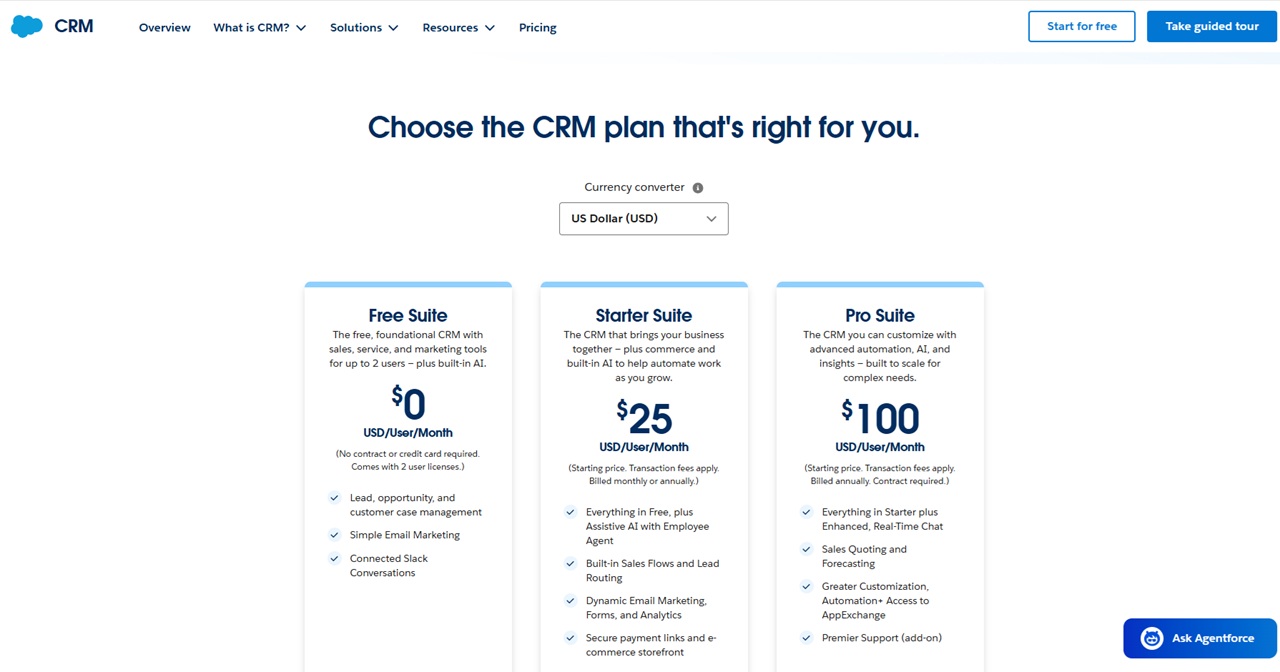
Salesforce CRM Pricing
- Free Suite – $0 (up to 2 users, limited features)
- Starter Suite – $25/user/month
- Pro Suite – $100/user/month (billed annually)
Salesforce’s pricing has become more transparent in recent years, especially for small businesses. However, its true power lies in its add-ons and enterprise customizations, which can significantly increase costs.
Best for: Businesses seeking a scalable, all-in-one CRM platform with advanced capabilities.
Visit the Salesforce website to find out more about them
2. Monday.com CRM
Monday.com has grown rapidly as a flexible CRM and work management tool.
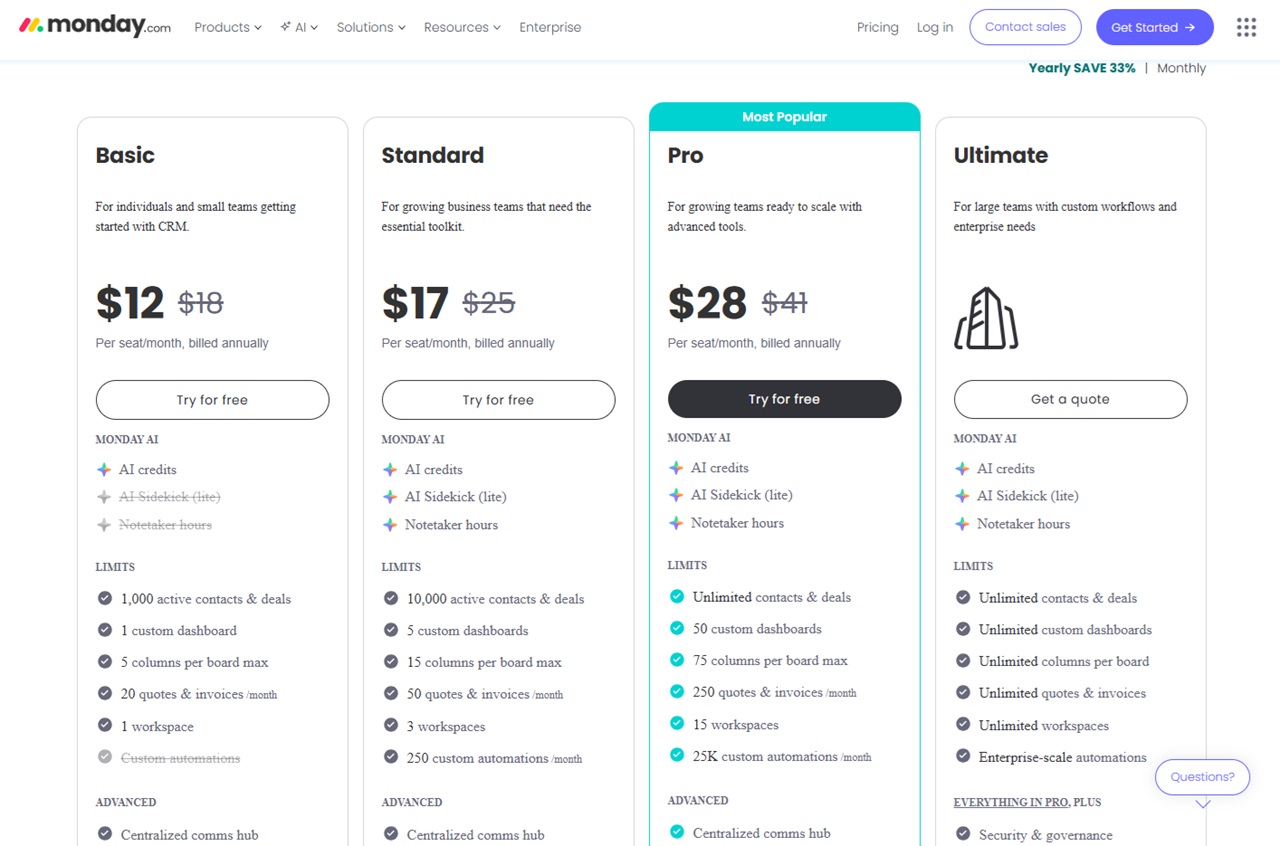
Pricing (Monthly)
- Basic – $18/user/month
- Standard – $25/user/month
- Pro – $41/user/month
- Enterprise – Custom
Annual discount: ~33% off
Strengths:
- Highly visual interface
- Strong automation features
- Competitive pricing
Best for: Teams wanting flexibility and ease of use at a lower cost than Salesforce.
Visit the Monday.com website to find out more about them
3. Zoho CRM
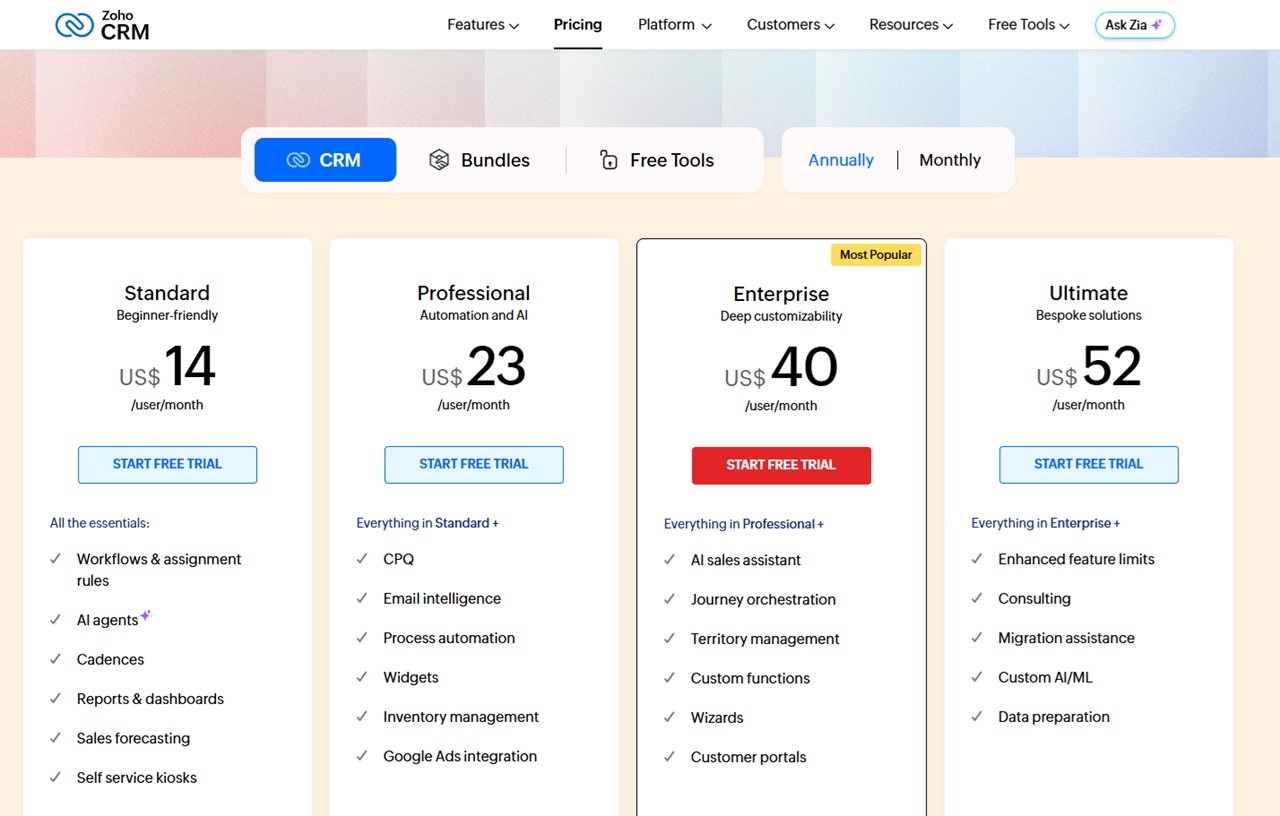
Zoho offers a wide ecosystem of business tools, with CRM as a core product.
Pricing (Monthly)
- Standard – $20/user/month
- Professional – $35/user/month
- Enterprise – $50/user/month
- Ultimate – $65/user/month
Annual discount: ~34% off
Strengths:
- Affordable entry point
- Broad suite of integrated tools
- Good scalability
Best for: Small to mid-sized businesses looking for value and ecosystem integration.
Visit the Zoho CRM website to find out more about them
4. Pipedrive
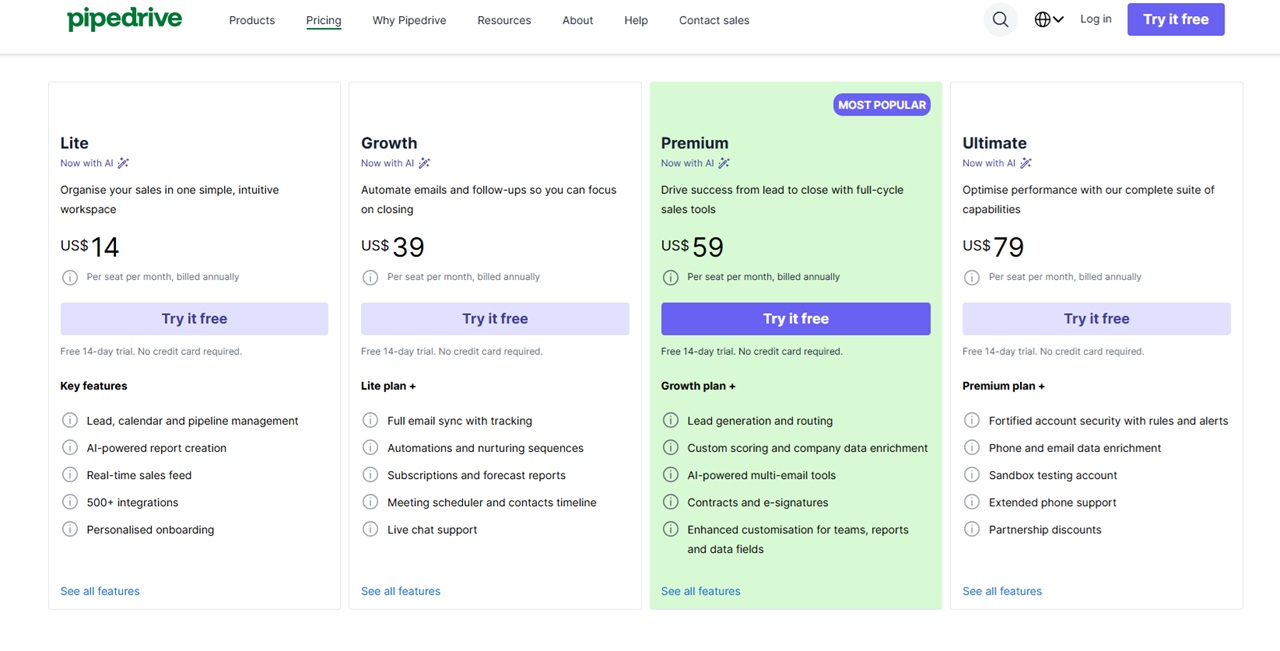
Pipedrive is known for its sales-focused simplicity.
Pricing (Monthly)
- Essential – $24/user/month
- Advanced – $49/user/month
- Professional – $79/user/month
- Enterprise – $99/user/month
Annual discount: significant (e.g., entry plan ~ $14/month)
Strengths:
- Easy-to-use pipeline interface
- Strong sales tracking
- Quick onboarding
Best for: Sales teams that want a straightforward, no-frills CRM.
Visit the Pipedrive website to find out more about them
5. Zendesk
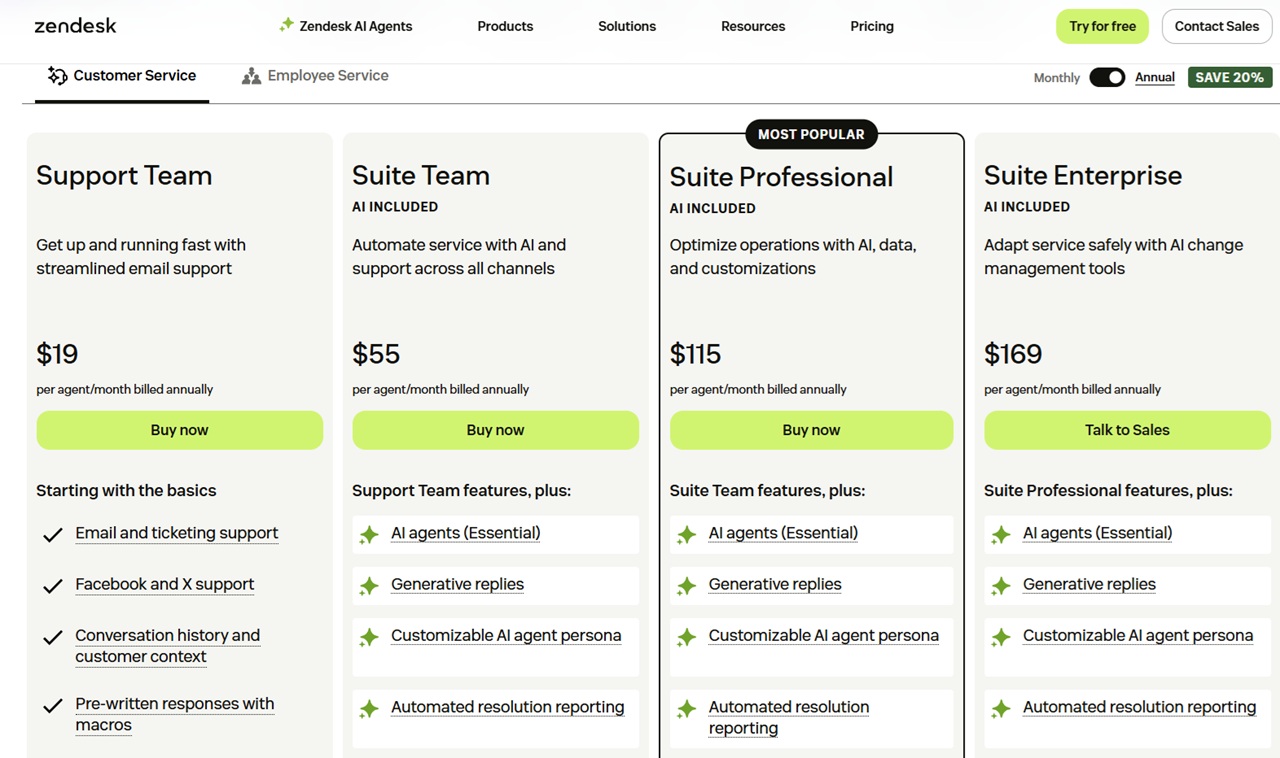
Zendesk focuses more on customer support than traditional sales CRM.
Pricing (Monthly)
- Suite Team – $25/agent/month
- Growth – $69/month
- Professional – $149/month
- Enterprise – $219/month
Annual discount: ~20%
Strengths:
- Industry-leading support tools
- Excellent ticketing system
- Scalable for large teams
Best for: Businesses prioritizing customer service and post-sales support.
Visit the Zendesk website to find out more about them
6. Salesmate
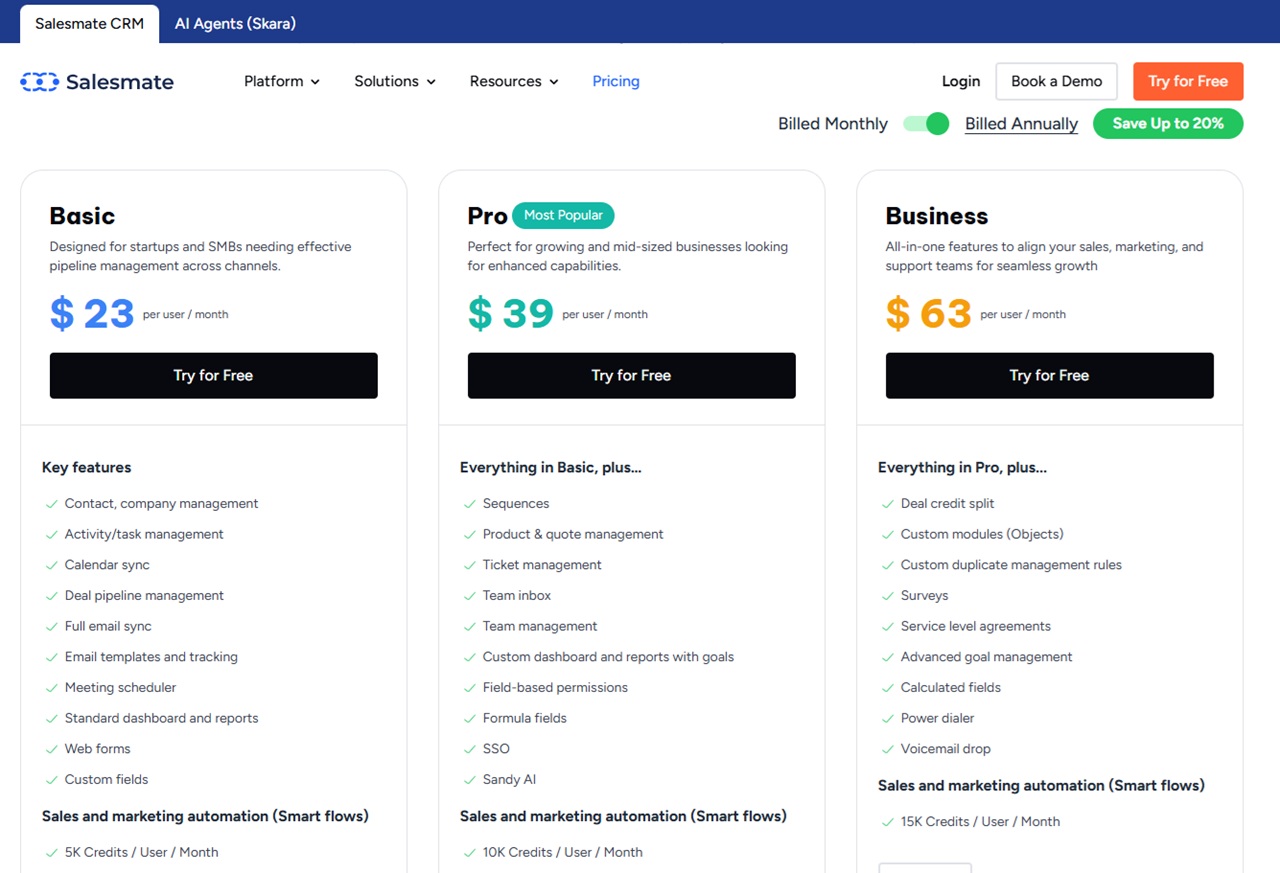
Salesmate is a growing CRM focused on automation and usability.
Pricing (Monthly)
- Starter – $29/user/month
- Growth – $49/user/month
- Boost – $79/user/month
Annual discount: ~20%
Notable:
- Onboarding starts at ~$2,000
- Transparent pricing otherwise
Best for: Businesses wanting automation without Salesforce complexity.
Visit the Salesmate website to find out more about them
7. HubSpot CRM
HubSpot is one of the most recognizable names in CRM, especially for inbound marketing.
Pricing
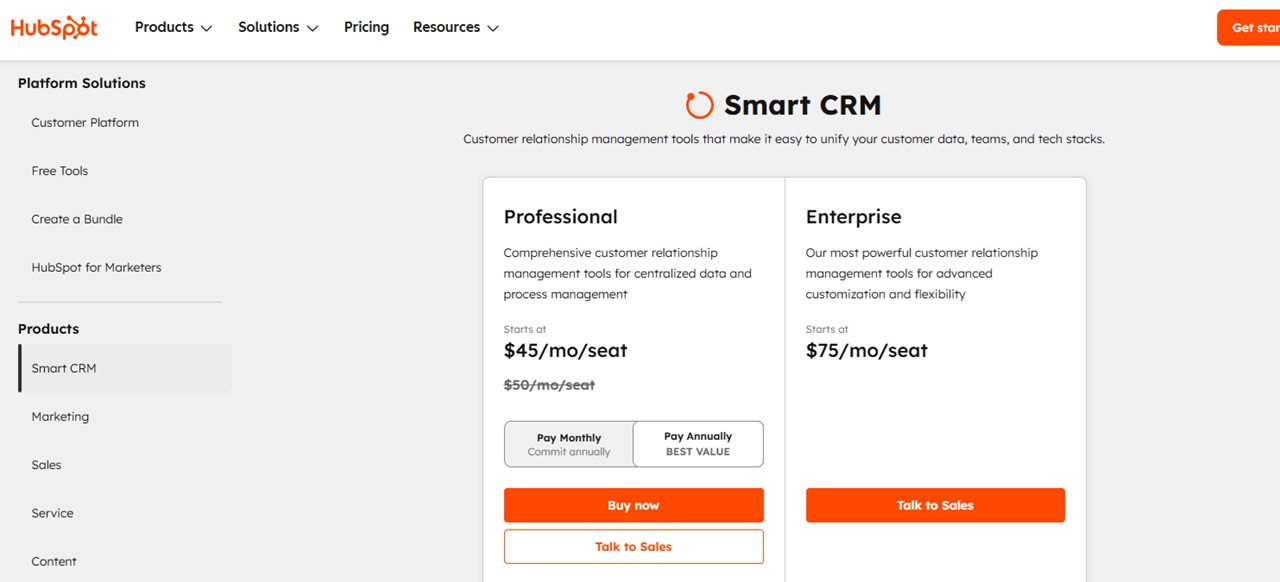
- Professional – $50/user/month ($45 annually)
- Enterprise – $75/user/month
Strengths:
- Clean, user-friendly interface
- Strong marketing integration
- Simple pricing
Positioning:
HubSpot sits in the mid-to-premium range—not the cheapest, but highly polished.
Best for: Marketing-driven teams and growing businesses.
Visit the HubSpot CRM website to find out more about them
8. Creatio
Creatio targets larger, enterprise-level organizations.
Pricing
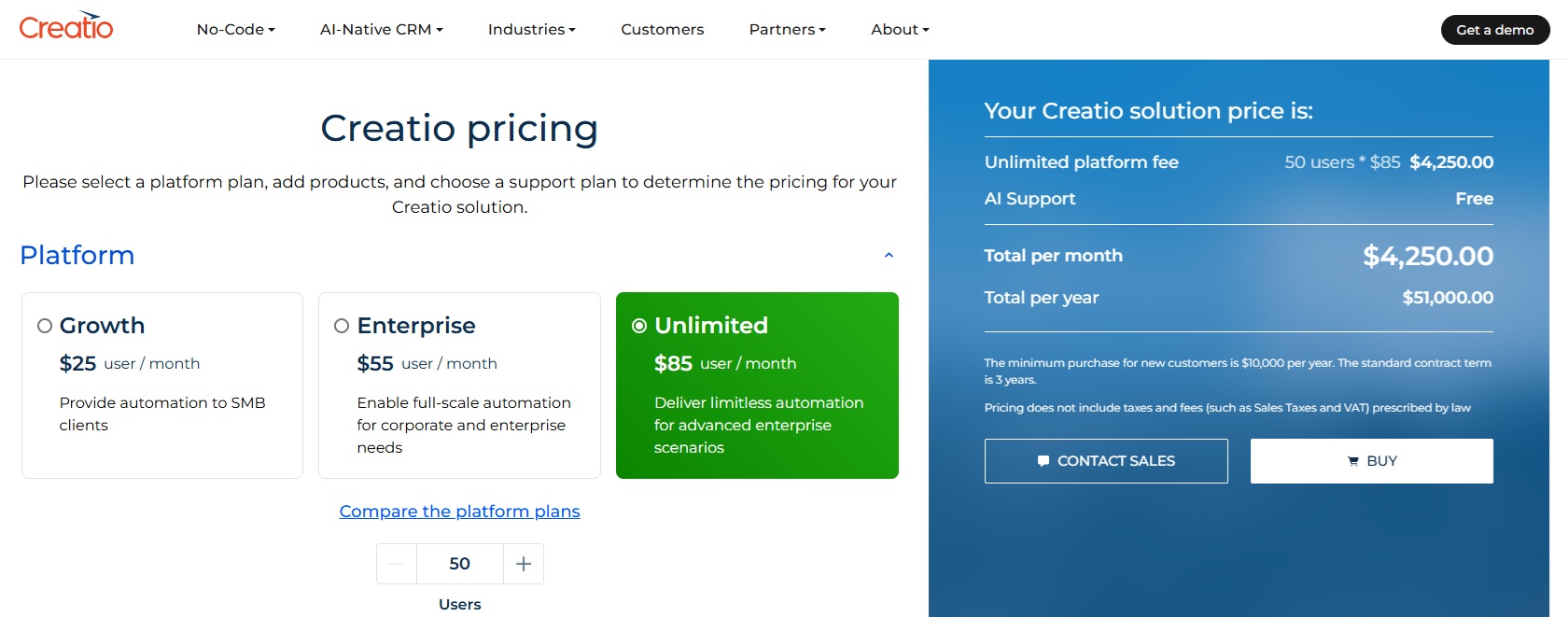
- Growth – $25/user/month
- Enterprise – $55/user/month
- Unlimited – Custom
Key Requirement:
- Minimum spend: ~$10,000/year
- Multi-year contracts (typically 3 years)
Strengths:
- Highly customizable
- Enterprise-grade workflows
Best for: Large organizations with complex CRM needs.
Visit the HubSpot CRM website to find out more about them
Key Takeaways
Salesforce Dominates, but Isn’t Always the Cheapest
Salesforce remains the most powerful and scalable CRM, but its full cost can grow quickly with add-ons.
Budget-Friendly Alternatives Exist
- Zoho and monday.com offer strong value at lower price points
- Pipedrive excels in simplicity for sales teams
Specialized Tools Stand Out
- Zendesk is ideal for support-focused teams
- HubSpot shines in marketing-driven environments
Enterprise Solutions Require Commitment
- Creatio is built for large businesses with significant budgets and long-term needs
Final Thoughts
Choosing the right CRM depends on your business size, budget, and priorities:
- Small businesses: Zoho, Monday.com
- Sales-focused teams: Pipedrive, Salesmate
- Marketing-heavy teams: HubSpot
- Support-driven companies: Zendesk
- Enterprises: Salesforce, Creatio
Salesforce may be the industry leader, but its competitors offer compelling alternatives, often at lower costs or with more focused functionality. Still not sure which to pick use the form below to get a free quote:
Full video transcript:
All right, today we’re going to look at seven Salesforce competitors and alternatives for CRM software.
Salesforce offers a huge range of products here. Look, we’re on the Salesforce product pricing page here, and they offer. Agent four, small business options, sales, cloud service, cloud marketing, cloud commerce, cloud ai, ai, app development, data security, CRM.
We’ll, we will check the CRM pricing out here. But just looking at here. Einstein AI Data 360 salesforce Slack Analytics, MuleSoft net zero. They have a huge amount of pricing here. So today we’re looking at just the alternative options for Salesforce and the pricing of each of those alternatives.
We’re going to look at seven different companies. We’re not going to go into detail on the various service offerings of them, a link to each of one of them, and you can check them out in your own time. But let’s jump into Salesforce. We can price compare against that. Salesforce has their CRM pricing here.
They are the, I think, undisputed leader when it comes to CRM. They claim that they’re the number one AI CRM, but I can think you could just say that they’re number one CRM in the market right now. Here are the various options that they have here. They have the free suite, which is $0, so actually free.
Per user per month. No contract or a credit card required that comes with two user licenses. And that gives you kind of the basic sort of things here. Obviously, you can do all sorts of different things on Salesforce, and then they have the starter suite, which is $25 US per user per month.
Transaction fees apply. They have a free option here to do that bunch of integrations. And then their pro suite is a hundred dollars per user per month. They have transaction fees. This one is billed manually sorry, billed annually. And the nice thing here about this is it’s billed monthly or annually.
We’ll see every other pricing thing here has different pricing for annual versus monthly, which we’ll get into here, but this is monthly or annually.
And for their pro suite, they’re just saying, we’re going to bill you annually for this. Pretty straightforward pricing. Actually, I really like this pricing model and it’s in the past I think Salesforce was not super transparent with this pricing, but obviously.
If you’re a small business, I want to get started here.
This is pretty, pretty simple and pretty easy as it gets, obviously. Salesforce will do all sorts of custom options here.
They have all sorts of additional sort of things that you can add onto it here. Obviously, we saw all those other things that they have here they’ll be happy to, to give you options for that.
Okay, so jumping in our first competitor and first alternative here is monday.com. One of the big companies in the CRM space there. We’re looking at monthly pricing here, not yearly we’ll jump to that in a second here, but so they have a basic plan.
At $18 per seat per month, build monthly standard plan at $25 per month. Build monthly. So, a thousand in that 10,000 here unlimited. Once you get into the pro plan at $41 per seat per month. And then the ultimate package. Of course, you can talk to sales, and they will create something custom just for you.
If you go annually, you save 33%, which is actually a really nice discount. The 18 drops to 1225 drops to 1741, drops to 28. Talk to sales. Still is talk to sales. Moving on. Zoho, CRM is our next competitor here. Zoho offers a huge range of different kind of software options here, but just looking at their CRM thing here, so a little bit more expensive on their, this is, again, monthly pricing, not annual.
Their starter thing is $20 per user month, professional at 35, enterprise at 50, and Ultimate at 65 here, again, with a range of different features. Again, as I say, I’ll link to these in the comment section below so you can check out their features a bit more. Their annual thing here, they’re saving 34% with yearly plans.
Again, this drops them to 14, 23, 40 and 52. Not too bad. $14 a month is pretty good. Although I guess it depends how many users you have here. And again, free trials across the board for all of their plans. Next competitor to Salesforce. Here is a pipe drive. Again, we are looking at the monthly prices, not the annual.
We have their liked plan at $24 per month, growth at $49 a month. Premium at 79, and Ultimate at $99 a per month. Again, this is Bill monthly, and you can see that drops down to just, again, $14 a month on their late plan. Again, the pricing here tends to come together quite close. 39, 59 and $79 per month.
And they offer a 14-day free trial with no commitments. A nice, nice way to get started here with that, if you want to give it a try, and again, you could in theory try the free trials of a couple of these ones here. If you’re not sure about which one you want. Our next competitor is Zendesk, which is less of a sale and more of a support sort of thing.
It still falls under that CRM umbrella sort of thing. But CRMs are often associated with sales. This is more the after sales process here. Again, we’re looking at the monthly prices here. They’re cheapest thing here is $25 per agent. Bill monthly, then 69, 1 49, and then two at 19.
They offer quite an expensive thing here. They have a kind of a higher end. Package that we see from some of the competitors here. If you go annual, they say you save 20%, so 19 55, 1 15, 1 69. 1 69 a month is more expensive than Pipedrive or Zoho or a monday.com at least in terms of pricing, which is transparent.
Going next, we have our next competitor is a sales mate. We have their sales mate, A CRM here. Again, we’re build monthly, their cheapest plan is $29 per user per month. Their pro plan, which they claim is the most popular, is $49 per user per month. And their business plan is $79 per user per month.
Again, this is billed monthly. If you switch to annual, you save 20%. 23, 39 and 63. Again, you can try all of them for free. I’m not quite sure how long their free trial period is. It’s not immediately obvious here. And of course, if you are an enterprise, you can get a custom. Bespoke a quote here.
One thing I do is that they just, they tell you that the onboarding is going to start at $2,000, so self-selects out here. And it’s really frustrating with software when you don’t have kind of some sort of transparent pricing here. But it’s really nice to see that everyone has some pricing available here.
Next up is HubSpot. I’m sure you’ve heard of them before. They are everywhere. They have a huge kind of media presence here but looking just their smart CRM and they have a, they have an even simpler kind of pricing here. They have, they’re professional, which is just $50 per month per seat if you pay monthly and if you pay annually, it is $45 per month per seat.
And then they have the enterprise solution, which is 70 to $5 per month per seat. And it gives you; this one gives you 3000 credits. This one gives you 5,000. And gives you a range of things here. Really, actually, really simple pricing on HubSpot hub spots spot here. They’re not going after the lowest end of the market.
Obviously. $45 a month comes out to above the prob below the business for sales mate. Again, is above the cheapest plan from Zendesk. Above the kind of cheapest plans, cheapest two plans from Pipedrive. Again, it’s all but the most expensive plan from Zoho and for Monday.
It is above all of their plans that have kind of transparent pricing on their site. Again, they’re going after a different type of customer here. And then finally we have I’m not sure a hundred percent how to pronounce this, but Creatio. They are a high-end CRM provider here. They have a, did you have a pricing page?
You can see here that they have their growth plan, just $25 per user per month, their enterprise plan, which is $55 per user, per month, and an unlimited plan. And then you can see how much it’s going to cost by adding the number of users here. The thing that is interesting here is that they’re very transparent about it, is that the minimum purchase for new customers is $10,000 per year.
They do not want really small businesses here. They are looking at serious sort of businesses. If unlimited plan here we would, so their cheapest plan is 50 users here, that would be $4,250 per month, or $51,000 per year. They would be happy with that. For enterprise to get up to that level there, you’d have to have.
What is it? 16 users on the enterprise plan to hit that $10,000. Again, it’s a three-year contract, that’s you have to be pretty serious about this. And then the growth planned, if we wanted to hit that 10,000 dollars per month minimum that they have, you would need 34 users. Again, this is for obviously aiming for a bigger business here.
Those, that is seven competitors to Salesforce and how much their various CRM plans cost. You can check out what other kind of features they have. I’ll link to each one of them in the comment section below. If you’ve used any of these and you have any kind of thoughts about how they are, obviously I haven’t reviewed how good the software is, just how expensive it is.
Or inexpensive it is. But if you have any comments about how good or not the software is, I’d love to hear it in the comment section below. Thank you very much.
Leave a Reply